กด Alt + คลิกสกิลในแถบสกิลลัด เพื่อบอกเพื่อนในปาร์ตี้ว่าสกิลนั้นเหลือคูลดาวน์อีกกี่วินาที หรือพร้อมใช้แล้ว — ไม่ต้องพิมพ์เอง
Alt + click a skill on your quick slot bar to tell the party how long its cooldown has left, or that it is ready — no typing.
วิธีใช้
กดปุ่ม Alt ค้างไว้ แล้วคลิกซ้ายที่สกิลในแถบสกิลลัด (Quick Slot) ที่อยากแจ้ง
- ใช้ได้กับสกิลที่วางอยู่ในแถบสกิลลัดเท่านั้น
- กดได้วินาทีละ 1 ครั้ง กันกดรัวจนแชทเต็ม
เหนือหัวตัวละครของคุณจะขึ้นกล่องไอคอนสกิลพร้อมเวลาที่เหลือ นับถอยหลังให้ทุกคนในปาร์ตี้เห็น พอหมดเวลาจะขึ้นคำว่า "พร้อม" สีเขียวสักครู่
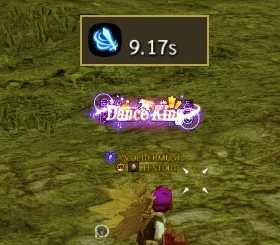
กล่องบนหัว — ไอคอนสกิลกับคูลดาวน์ที่เหลือ 9.17 วินาที ในแชทปาร์ตี้จะขึ้นข้อความให้อัตโนมัติ เช่น "[Moon Blade Dance] เหลือ 9.5 วินาที" หรือ "[Moonlight Splitter] พร้อมใช้" พร้อมเสียงแจ้งเตือน
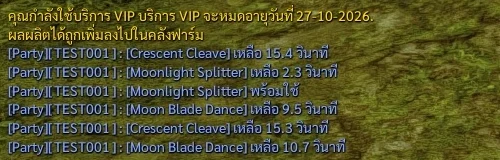
ข้อความในแชทปาร์ตี้ — บอกชื่อสกิลและเวลาที่เหลือ
How to use it
Hold Alt and left-click the skill on your quick slot bar.
- Only skills placed on the quick slot bar
- Once per second at most, so chat does not get flooded
A box with the skill icon and the time left appears over your head and counts down for the whole party. When it ends it shows "พร้อม" (ready) in green for a moment.
The head box — skill icon and 9.17 s of cooldown left. Party chat gets a line on its own, e.g. "[Moon Blade Dance] เหลือ 9.5 วินาที" (9.5 s left) or "[Moonlight Splitter] พร้อมใช้" (ready), with a sound cue.
The party chat lines — skill name and time left.
ใช้ตอนไหนดี
นัดจังหวะกับเพื่อนก่อนเปิดบอส
- บอกว่าสกิลแรง สกิลบัฟ หรือสกิลฮีลของเราจะพร้อมอีกกี่วินาที เพื่อนจะได้รอปล่อยพร้อมกัน
- ช่วงต่อสู้ไม่ต้องหยุดพิมพ์ แค่ Alt + คลิกครั้งเดียว
ไม่ได้อยู่ในปาร์ตี้ก็กดได้ แต่จะเห็นแค่คุณคนเดียว ไม่มีข้อความส่งออกไป
When it helps
Time your burst with the party before a boss.
- Tell them when your big hit, buff or heal comes back so everyone can line up
- No need to stop and type mid-fight — one Alt + click
Works out of a party too, but only you see it and nothing is sent.