ดูว่าใครในปาร์ตี้ทำดาเมจเท่าไหร่ DPS เท่าไหร่ และแต่ละสกิลทำดาเมจไปกี่เปอร์เซ็นต์ — ขึ้นอัตโนมัติเมื่อเข้าดันเจี้ยน
See how much damage and DPS everyone in the party deals, and how much each skill contributes — it appears by itself in dungeons.
หน้าต่างหลัก
เข้าดันเจี้ยนเมื่อไหร่ หน้าต่าง Damage Meter จะขึ้นที่มุมขวาบนเอง ในเมืองและพื้นที่ปลอดภัยจะไม่ขึ้น
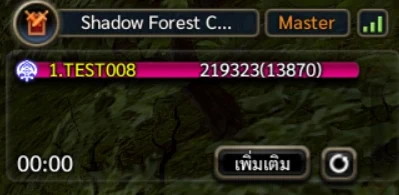
หน้าต่างหลัก — ชื่อดัน ระดับความยาก อันดับดาเมจ เวลาต่อสู้ ปุ่มเพิ่มเติม และปุ่มรีเซ็ต อ่านตัวเลขในแต่ละแถว เช่น "1.TEST008 219323(13870)"
- 1. คืออันดับดาเมจในปาร์ตี้ ชื่อของเราเองเป็นสีเหลือง
- 219323 คือดาเมจรวมทั้งหมด
- (13870) ในวงเล็บคือ DPS หรือดาเมจเฉลี่ยต่อวินาที
- สีของแถบบอกคลาส ความยาวแถบเทียบกับคนที่ทำดาเมจสูงสุด
เวลามุมซ้ายล่าง (00:00) นับเฉพาะเวลาที่กำลังต่อสู้ ช่วงที่หยุดตีนานเกิน 3 วินาทีจะไม่นับเพิ่ม DPS จึงไม่ตกเพราะเดินหาม็อบ
- ดาเมจจากสัตว์อัญเชิญหรือสิ่งที่เราเรียกออกมา นับรวมเป็นของเรา
The main window
It opens at the top right whenever you enter a dungeon. It never shows in towns or safe areas.
The main window — dungeon, difficulty, damage ranking, fight time, the More button and Reset. Reading a row, e.g. "1.TEST008 219323(13870)"
- 1. is the rank in the party; your own name is yellow
- 219323 is the total damage
- (13870) in brackets is DPS, damage per second
- The bar colour shows the class; its length is relative to the top damage dealer
The clock at the bottom left (00:00) counts fighting time only. A pause longer than 3 seconds adds no more, so walking between packs does not drag your DPS down.
- Damage from your summons counts as yours
ดูดาเมจรายสกิล
กดปุ่ม "เพิ่มเติม" จะเปิดหน้าต่าง Skill Damage Proportion บอกว่าแต่ละสกิลทำดาเมจไปเท่าไหร่ และกี่เปอร์เซ็นต์
- อยากดูของเพื่อนในปาร์ตี้ คลิกชื่อเพื่อนในหน้าต่างหลักก่อนแล้วค่อยกดเพิ่มเติม ถ้าไม่ได้เลือกใคร จะแสดงของเราเอง
- Normal/Special Attack คือการโจมตีปกติ (คลิกซ้าย / ขวา)
- Damage over time คือดาเมจต่อเนื่อง เช่น ไฟไหม้ พิษ ส่วน Summon คือดาเมจจากสัตว์อัญเชิญ
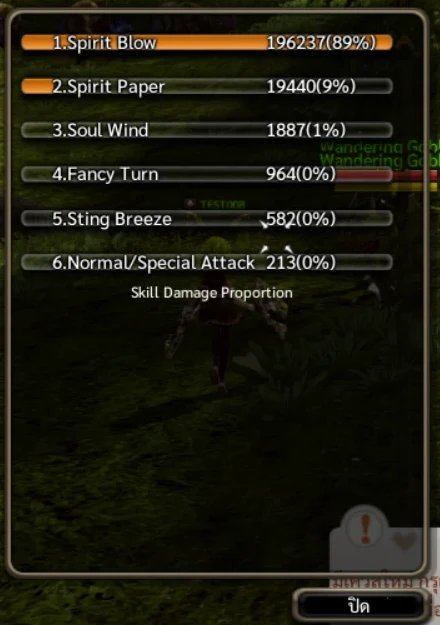
Skill Damage Proportion — ตัวอย่างนี้ Spirit Blow ทำดาเมจไป 89% ของทั้งหมด ใช้หน้าต่างนี้ปรับคอมโบได้ — สกิลไหนดาเมจน้อยเกินไป ลองย้าย SP ไปลงสกิลที่ได้ผลกว่า (รีเซ็ต SP ในหน้าต่างสกิลทำได้ฟรีในเมือง)
Damage by skill
Press "เพิ่มเติม" (More) to open Skill Damage Proportion — the damage and share of each skill.
- To see a party member, click their row first, then More. With nothing selected it shows your own
- Normal/Special Attack is your plain left and right click attacks
- Damage over time covers burns, poison and the like; Summon is damage from your summons
Skill Damage Proportion — here Spirit Blow deals 89% of the total. Use it to tune your build — move SP away from skills that barely contribute (Reset SP in the skill window is free in town).
รีเซ็ตและเปิด / ปิด
ตัวเลขจะสะสมไปเรื่อย ๆ จนกว่าจะกดรีเซ็ต กดปุ่มวงกลมข้างปุ่มเพิ่มเติม แล้วกดยืนยัน ตัวเลขทั้งหมดจะเริ่มนับใหม่
- อยากวัดดาเมจกับบอสอย่างเดียว ให้กดรีเซ็ตก่อนเข้าห้องบอส
ไม่อยากให้หน้าต่างบังจอ พิมพ์ /dps ในช่องแชทเพื่อซ่อน พิมพ์อีกครั้งเพื่อเปิดกลับ
- เกมจำค่านี้ไว้ ปิดแล้วจะปิดต่อในดันถัดไปด้วย
- เปิดปิดได้อีกทางที่ช่อง Damage Meter ในหน้าต่างตั้งค่าเกม
Reset and show / hide
Numbers keep adding up until you reset. Press the round button next to More and confirm to start counting again.
- To measure a boss fight alone, reset just before the boss room
Type /dps in chat to hide the window, and again to bring it back.
- The choice is remembered for the next dungeons too
- You can also tick Damage Meter in the game options