ใส่ชุด Conversion ไว้เอาค่าพลัง แล้วเลือกชุดแฟชั่นที่ชอบมาเป็นหน้าตาแทน ค่าพลังไม่หาย ชุดแฟชั่นก็ไม่หาย และไม่เสียค่าใช้จ่าย
Wear Conversion pieces for their stats, then dress them in any fashion costume you like. Stats stay, the costume is not used up, and it is free.
ระบบนี้ทำอะไร
ชุด Conversion คือชุดที่มีค่าพลัง สวมในช่องชุดแฟชั่น (หมวก เสื้อ กางเกง ถุงมือ รองเท้า อาวุธ เครื่องประดับ ปีก หาง) ระบบนี้ให้เอาหน้าตาของชุดแฟชั่นตัวอื่นมาแสดงแทน
- ค่าพลังมาจากชุด Conversion เหมือนเดิมทุกอย่าง
- หน้าตาที่ทุกคนเห็นเป็นชุดแฟชั่นที่เลือก
- ชุดแฟชั่นไม่ถูกใช้หมด ถอดหน้าตาออกเมื่อไหร่ชุดก็กลับเข้ากระเป๋าแคช
What it does
Conversion pieces are costumes with stats, worn in the fashion slots (head, top, bottom, gloves, shoes, weapons, accessories, wings, tail). This system shows another costume's look over them.
- The stats are still the Conversion piece's
- Everyone sees the costume you picked
- The costume is not consumed — it returns to your cash bag when you take the look off
วิธีเปลี่ยนหน้าตา
สวมชุด Conversion ไว้ก่อน แล้วในเมืองกดไอคอน Costume ที่มุมขวาบน (ข้าง Town Warp)
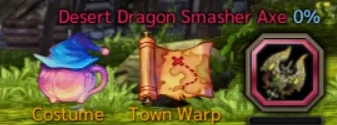
ไอคอน Costume — ขึ้นเฉพาะตอนอยู่ในเมือง หน้าต่าง Costume จะเปิดขึ้น ทางซ้ายคือตัวละครกับชุด Conversion ที่สวมอยู่ ทางขวาคือหมวดชุดแฟชั่นในกระเป๋าแคช
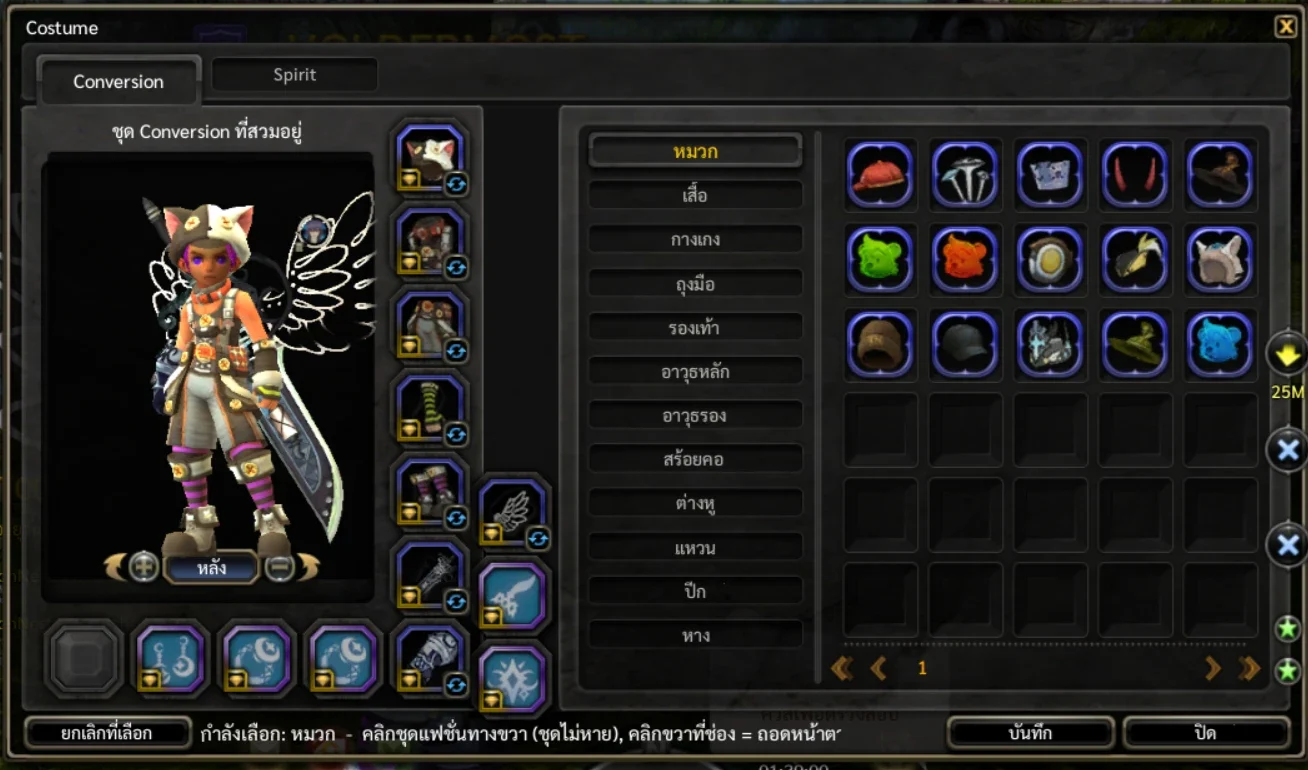
หน้าต่าง Costume แท็บ Conversion — เลือกหมวก แล้วคลิกชุดแฟชั่นทางขวา ตัวละครทางซ้ายเปลี่ยนให้ดูทันที เลือกหมวดที่จะเปลี่ยน (เช่น หมวก) จากรายการตรงกลาง หรือคลิกช่องชุดทางซ้าย แล้วคลิกชุดแฟชั่นที่ชอบทางขวา
- ดูตัวอย่างบนตัวละครได้ก่อน กดปุ่มลูกศรเพื่อหมุนดูด้านหลัง
- เปลี่ยนได้หลายช่องพร้อมกันก่อนกดบันทึกครั้งเดียว
พอใจแล้วกดปุ่ม "บันทึก" หน้าตาใหม่จะมีผลทันที
How to change the look
Wear your Conversion pieces, then in town press the Costume icon at the top right (next to Town Warp).
The Costume icon — it shows only in town. The Costume window opens: your character and worn Conversion pieces on the left, your fashion costumes by category on the right.
The Costume window, Conversion tab — pick Head, then click a costume on the right and the preview updates. Choose a category (e.g. Head) in the middle list or click a slot on the left, then click the costume you want on the right.
- Check the preview first — the arrows rotate the character
- You can change several slots and save them all at once
Happy with it? Press "บันทึก" (Save) and the new look applies at once.
ถอดหน้าตาออก
คลิกขวาที่ช่องชุดทางซ้ายของหน้าต่าง Costume หน้าตาของช่องนั้นจะถูกถอดทันที และชุดแฟชั่นจะกลับเข้ากระเป๋าแคช
- ถ้าช่องนั้นแค่เลือกไว้แต่ยังไม่บันทึก คลิกขวาจะยกเลิกที่เลือกของช่องนั้นแทน
- ถอดชุด Conversion ชิ้นนั้นออกจากตัว ชุดแฟชั่นที่ใช้เป็นหน้าตาก็จะกลับเข้ากระเป๋าเหมือนกัน
Taking a look off
Right-click a slot on the left of the Costume window. That slot's look comes off at once and the costume goes back to your cash bag.
- If the slot only has an unsaved pick, right-click just cancels that pick
- Removing the Conversion piece itself also returns its costume to the bag
ข้อควรรู้
ชุดแฟชั่นแบบชิ้นเดียว (ชุดยาวที่คลุมหลายส่วน) จะใช้แทนหลายช่องพร้อมกัน ช่องที่ถูกคลุมจะเป็นสีจางและเปลี่ยนแยกไม่ได้
ชุดแฟชั่นต้องเป็นของที่คลาสของเราใส่ได้ และต้องตรงกับช่อง เช่น ใช้หมวกกับช่องหมวก
ช่องที่ยังไม่ได้สวมชุด Conversion จะเปลี่ยนหน้าตาไม่ได้ ต้องสวมชุด Conversion ของช่องนั้นก่อน
Good to know
One-piece costumes cover several slots at once; the covered slots dim and cannot be changed on their own.
The costume has to be wearable by your class and match the slot — a hat for the head slot, and so on.
A slot without a Conversion piece cannot take a look — wear the piece first.